fieldnotes 13
.png)
Fieldnotes #13
Hot August Nights!
I don’t know if it’s the excessive heat addling my brain or what, but I’ve been doing a lot more reflection and “soul searching” lately. 🫠
It’s been just over a year since I retired from full-time teaching, and let’s just say things haven’t gone exactly according to plan. 🙈 I envisioned myself finally having endless free time to pour into my creative business…you know, long mornings, big ideas, coffee in a cute mug, the whole vibe.
But it turns out, time without structure is a weird beast. Despite my best efforts, the days disappear, the energy shifts, and lately I’ve found myself sitting with bigger questions about what kind of work I actually want to be doing, and how I want it to feel.
So I’m moving a little slower right now. Don’t panic - I’m not disappearing or burning it all down. 😂 I’m just choosing to be more thoughtful, more deliberate, and a lot less frantic. I’m letting go of the pressure to turn every idea into a sprint, and I’m exploring ways to pivot so that what I’m building stays calm, aligned, and still profitable.
That includes reflecting on what I’m doing here - with these Fieldnotes, with the Toolkits, and with you, my generous and thoughtful audience. 💟
I’ll be sharing more about all of this in future Fieldnotes, in case you’re also feeling the nudge to make a few shifts of your own. 😉 In the meantime, let’s get this hot August party started!
Remember, as always, you’re free to just scroll down and snag this month’s freebie! You know I won’t judge! 😉
(But you do not want to miss out on the Field Tested Finds this month - there is a sweet deal for a great product: AI Faceless Reels (and I have a very cool bonus to go with it!).
.png)
Product Updates
(But you do not want to miss out on the Field Tested Finds this month - there is a sweet deal for a great product: AI Faceless Reels (and I have a very cool bonus to go with it!).
Product Updates
Christmas Designers Toolkit
I mentioned this in the email, but I’ve added the 2026 calendar SVG and PNG files to the Google Drive folder, so get in there and get to work on your calendar-based products. 🎉 These types of products are always profitable for me and they sell well into the new year!
In fact, here’s my little hot take on the whole “replace” thing when it comes to calendars. I don’t do it. I make NEW designs every year with the current year on it. I do NOT replace the previous year’s products (using the “replace” button). I DO change those products to “direct-only,” though.
The reason I don’t just replace them or delete them is because people DO come back and buy items from previous years - for whatever reason. I’ve had customers deliberately purchase calendar products up to 2 years old, so I feel like it’s worth it to keep them. But like I said, I do switch them to “direct-only,” which means the products aren’t searchable in the marketplace but are only visible using the link. I do this so I don’t have to go find my old Pinterest pins and update/remove them - those links are still good! So if someone searches for a “2023 Calendar Kitchen Towel” on Pinterest I may still get a sale.
However - your mileage may vary, as they say! If you “replace” yours and that works for you, keep on doing it. Or if some Zazzle guru or smartypants in the Forums told you otherwise, go ahead and listen to them if you want. You won’t hurt my feelings. Like I always say - I’m not the boss of you! 😎
If you don’t have the Christmas Toolkit yet, you can grab it here:
.png) It’s FULL of awesome stuff! And if you missed the Flash Sale where it was priced low low low, you can still get it here for just $14 (about 50% off - not as low as the Flash Sale, but still a steal!). Use the code MERRYAUGUST (which should also tell you this will expire at the end of August. 😉)
It’s FULL of awesome stuff! And if you missed the Flash Sale where it was priced low low low, you can still get it here for just $14 (about 50% off - not as low as the Flash Sale, but still a steal!). Use the code MERRYAUGUST (which should also tell you this will expire at the end of August. 😉)Stock Photo Vault
You have access to this growing vault if you’ve purchased any of our Toolkits; it contains a TON of placeholder photos for you to use in your products and templates. I had added some new ones around graduation season and when I launched the Wedding Toolkit, so this round I added some general family-based images to use in your holiday products and giftable products - there are well over a hundred new images in there. Oh! And I also added a folder of images that are “vintage/retro” style, in case you are making products that need back-in-the-day style photos.
You’ll find the new drop (aptly named “2025 Midsummer Drop” 😎) inside the Stock Placeholder vault. And if you’re looking for that link, you can grab it from inside whatever Toolkit you purchased. 😉
A few quick reminders:
📸The vault is the same for everyone, so if you’ve purchased ANY of the Toolkits you have access to the full vault! 🎉
📸The images are designed to be used as placeholders and viewed on a screen; they’re not designed to be printed. If you want to use them in your printable products (which you are allowed to do), make sure they don’t need to be upscaled first.
🤖Yes, these are AI generated. That’s part of the point of the vault - these people do not exist, so there are no “model licensing” restrictions. 🎉 I do go in and add my original contributions to them (in line with U.S. Copyright Office guidance), such as adjusting compositions, adding/removing items from the scene, adjusting tones/colors, etc.
Wish you had access to hundreds (HUNDREDS) of placeholder images to use in your own products? Grab any one of our Toolkits! In fact, this would be a great time to grab the Christmas Designers Toolkit at a sweet discount! Here’s that link again if you don’t feel like scrolling up to get it. 😉
You have access to this growing vault if you’ve purchased any of our Toolkits; it contains a TON of placeholder photos for you to use in your products and templates. I had added some new ones around graduation season and when I launched the Wedding Toolkit, so this round I added some general family-based images to use in your holiday products and giftable products - there are well over a hundred new images in there. Oh! And I also added a folder of images that are “vintage/retro” style, in case you are making products that need back-in-the-day style photos.
You’ll find the new drop (aptly named “2025 Midsummer Drop” 😎) inside the Stock Placeholder vault. And if you’re looking for that link, you can grab it from inside whatever Toolkit you purchased. 😉
A few quick reminders:
📸The vault is the same for everyone, so if you’ve purchased ANY of the Toolkits you have access to the full vault! 🎉
📸The images are designed to be used as placeholders and viewed on a screen; they’re not designed to be printed. If you want to use them in your printable products (which you are allowed to do), make sure they don’t need to be upscaled first.
🤖Yes, these are AI generated. That’s part of the point of the vault - these people do not exist, so there are no “model licensing” restrictions. 🎉 I do go in and add my original contributions to them (in line with U.S. Copyright Office guidance), such as adjusting compositions, adding/removing items from the scene, adjusting tones/colors, etc.
Wish you had access to hundreds (HUNDREDS) of placeholder images to use in your own products? Grab any one of our Toolkits! In fact, this would be a great time to grab the Christmas Designers Toolkit at a sweet discount! Here’s that link again if you don’t feel like scrolling up to get it. 😉
Zazzle Unleashed Remains (Mostly) The Same
Aside from a few small tweaks and the addition of the Collections video, Zazzle Unleashed hasn’t seen major updates, and that’s been intentional. The core content is still solid, and even with Zazzle’s recent changes, the foundational info in the course still holds up. I’ve been focusing my time and energy on other projects lately, so I’m not sure if or when I’ll do a full refresh. But if that ever changes, you’ll be the first to know. 😉
Aside from a few small tweaks and the addition of the Collections video, Zazzle Unleashed hasn’t seen major updates, and that’s been intentional. The core content is still solid, and even with Zazzle’s recent changes, the foundational info in the course still holds up. I’ve been focusing my time and energy on other projects lately, so I’m not sure if or when I’ll do a full refresh. But if that ever changes, you’ll be the first to know. 😉
.png)
Promotion & Marketing
Maybe you’ve heard the “popular business advice” that says you should spend 80% of your time promoting and only 20% creating. I get the reasoning: a lot of people spend most of their time designing, tweaking, and reworking their shop, and then wonder why they’re not seeing traffic or sales.
But even with Zazzle pushing US to do more of the promotional work now, I’m not sure that the 80/20 split is practical for all of us, especially not on Zazzle. And here’s why:
We’re all in different phases of our business.
When you’re first starting out, you genuinely need a larger volume of products (good, well-researched ones, please!). That’s your growth phase, and during that time, creation naturally takes up more of your time. Plus, Zazzle some of the heavy lifting when it comes to visibility, which is part of what makes it so appealing in the early days.
BUT. It’s easy to get stuck in creator mode and forget that we also need to work on other things. (And no, I don’t mean redoing your store banner for the 12th time.🙈😅 #PreachingToMyself)
Besides, there’s more to running a successful Zazzle shop than just “creating” and “promoting.” So here’s a breakdown that feels a little more realistic to me:
Niche / Trend / SEO Research: 5-10%
Product Creation / Listing: 50-60%
INTENTIONAL Promotion / Marketing: 40-50%
Admin / Analytics / Store Strategy: 5-10%
(Yes, those add up to 100%. Sort of. 🙈)
You’ll notice I said INTENTIONAL promotion and marketing. I plan (and encourage you) to be more proactive about my marketing efforts; not just pinning the product and being done with it, but taking intentional time to create engaging pins and posts. I want to do more to get a larger slice of that referral pie!
Ultimately the balance will shift depending on where you’re at in your journey. But if you’re only ever creating and never promoting or analyzing what’s working, that’s where you’re going to really start seeing the slowdown in your progress.
Updates at Zazzle
🎉The new Opacity Slider is giving me all the feels lately! 🤩 I’ve been wanting this for about as long as I’ve been on Zazzle, so I’m happy to see they’ve finally listened to me! Hahah!
My good friend Lisa over at Happy Zazzling has made a short but informative video showing you how this tool works. Click here to check it out.
🤑 Next, if you haven’t noticed, the new “enhanced” earnings reports are live. You can find them by clicking on the little eyeball icon next to your royalties and referrals.

This will open a new tab where you’ll see all kinds of information on that sale. As you scroll down, you’ll see the full breakdown of your royalty (and referral if you got one). Here is an example that includes both a royalty and a referral:
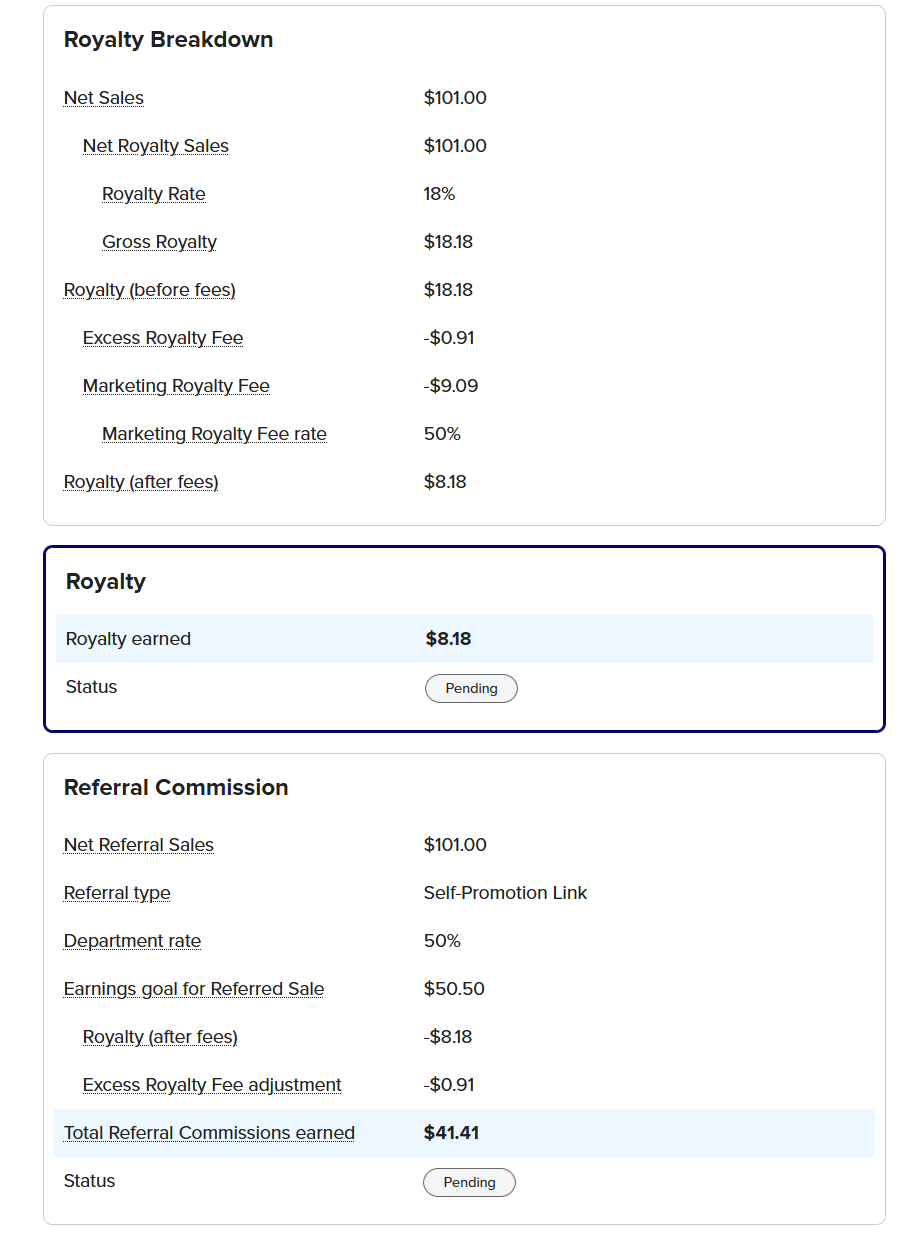 Now, what you do with all this new info is up to you. I’ve been ignoring it, for the most part. 😅 But I know some of you like numbers and math and chaos, so have at it! 🙈
But seriously, it’s nothing to panic over - it’s just information. Yes, it’s frustrating to see that NOW Zazzle keeps more than it was giving us before, but we’ve talked about this in the past (so so so many times) so I’m not going to beat it up again here.
I’ll just remind you of these things:
⚡All the marketplaces are reducing royalties right now (or increasing fees).
⚡You get to use Zazzle’s platform for FREE to host your products. Here is a (Not So) Fun Fact: I dropped $10 on listing fees ALONE on Etsy this week, and that’s just to list them! If they don’t sell in a few months I have to pay again to keep them listed! And if they do sell, another whole chunk of fees will come out! No other platform is out here saying, “Hey, go ahead and list your stuff for free…and we’ll even send some traffic your way if your stuff is good.” Zazzle is a bit of a unicorn that way. So sure, there are challenges…but it’s still a pretty generous setup compared to everywhere else.
What should you be creating right now?
It’s the Holiday Season! 🎶If you haven't already, NOW is the time to start creating!
❄️Winter Holidays: Christmas, Hanukkah, New Year, etc.
Pro Tip: If you normally focus on cards/party supplies, consider branching out to “giftable” items this year! And if you normally focus on the giftable items, consider adding some cards and party supplies! You can use the Christmas Designers Toolkit to give you a head start (remember to use the code MERRYAUGUST to get a sweet discount) and the new “grid” templates in Zazzle to make things go really fast!
🍁If you want to design for Thanksgiving (or Friendsgiving), get on it - time is almost up for those this year! Of course, remember that everything you post will still be there next year, so you are never really behind...you are just sometimes way ahead! 😅
What should you be promoting right now?
🎒Back to School
🎃 Halloween🎒Back to School
.png)
This month’s freebie is a little bit of holiday cheer for you! Pink and green started trending in Christmas designs last year, and it’s still going strong this year - maybe even stronger. The research backs it up too. From soft blush and mint to vintage pastels and even gingham, this playful palette is showing up all over Zazzle, Etsy, and Pinterest. It works especially well for nostalgic, candy-themed, or sweet retro styles.
So for your freebie this month, I put together a little Pink & Green Christmas Mini Pack. It includes samples from two larger packs I plan to release later (maybe in an upcoming Toolkit, maybe just as standalone clipart packs… oooh, such mystery! 😎).
You’ll get 6 commercial-use graphics: a few cute and trendy trees plus a couple of seamless gingham patterns (because Zazzle seems to be leaning into gingham this year).
Click here or on the image below to the pack and have fun with it. Keep an eye out for the full sets coming soon (they’re cute).
.png)
There’s no Inspiration Brief this month, though, because your brief should be to read Zazzle’s 2025 Holiday Creator Guide!
I’m serious - your BEST opportunity to make money on Zazzle this holiday season (or any time) is to give Zazzle what it wants. They are literally handing us their playbook on a silver platter here! There’s no reason to try to reinvent the wheel or come up with the next greatest trend - just use what Zazzle knows will work!
Oh, and if you DO want to branch out and come up with a wild new trend or just put your random AI generated “cat nativity” design on non-personalized items, just keep in mind that designs aligned with Zazzle’s goals are more likely to get featured, seen, and sold. #JustSayin
p.s. In case you clicked that cat nativity link, I made that design last Christmas as a test to prove my own point. It has had exactly 2 views. No one is searching for “cat nativity,” and that design has very little chance of being seen at all, much less selling; that’s not Zazzle’s fault - it’s mine.
.png)
Reminder: These are affiliate links! If you purchase them, I do get a small commission (at no extra cost to you). But as promised, I will only ever recommend products I use and love!
Remember how I said I’d be talking about pivoting in future newsletters? Well, I’m kicking that off by telling you about a super fun (and potentially very lucrative) program my biz bestie Julie Coffman just released: AI Faceless Reels.
Wait, what’s that got to do with Zazzle?
I’m so glad you asked. 😏
Let’s talk about those self-referrals…you know, that magical combo of Zazzle royalty + referral earnings that can really move the needle on your income. The catch? You’ve got to send people to your own products, and we all know Zazzle’s not doing much of that for you. 🙈
That’s where reels come in - specifically Faceless Reels…with some help from AI.
Faceless Reels are quick, low-effort videos perfect for promoting your Zazzle products on social media and Pinterest. No dancing, no showing your face, and no need to brush your hair (my personal favorite part). 🤣 I’ve used an interactive faceless reel to drive Christmas card sales every year, and it works! And I haven’t even been using it well, so I can only imagine what would happen if I actually had a system. 🙈
Right now, you can grab Julie’s brand new course AI Faceless Reels for around $20 - it’s on a “dime sale,” which means the price ticks up with each purchase until it hits $25. It is on sale from August 8-11. Then, after August 11, it jumps to $37. Click here or on the image below and grab it before the price goes up!
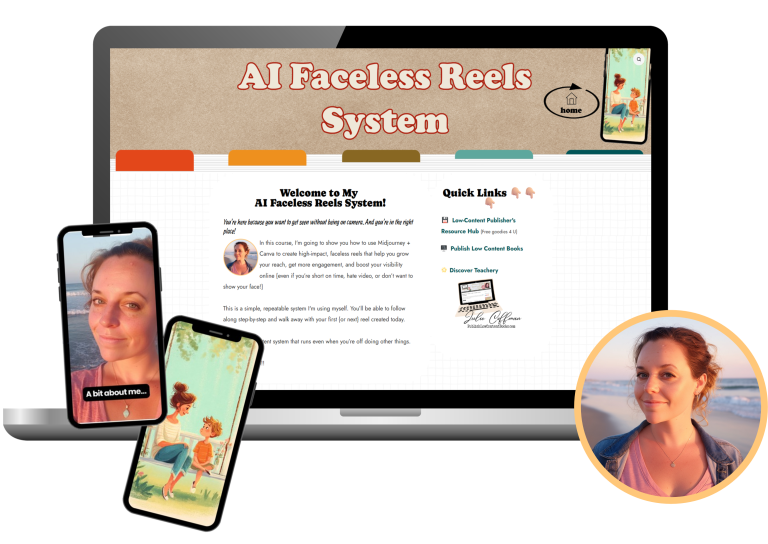
If you want to start sending traffic to your own products and earning those sweet referral bonuses, or maybe you just want to find a fun and inexpensive way to connect with your audience, friends, or family, AI Faceless Reels is your new secret weapon. 😎 Julie will walk you through how to use AI (Midjourney + Canva, but the skills are easily transferable) to create an actionable system that will work for you!
I got it, and it’s going to be part of my new-and-improved “intentional promotion and marketing” plan. 😎 I want my business to feel calm and profitable, and this is one smart way to get there.
🎉 Bonus from me: If you buy through my link, I’ll send you my Interactive Video Template (the one I mentioned in above), totally FREE. It’s a Canva template for making a fun, tappable reel to showcase your favorite Zazzle products. I use it on Instagram, Pinterest, and TikTok! Until now, it’s only been available inside the Christmas Designers Toolkit!
And if you’re like me and love a good bonus stack...After you buy, Julie will offer a couple of upsells:
⭐A content kit (extra hooks, prompts, and templates) for just $12
⭐3 weeks of 1:1 email coaching with Julie herself where you can get personalized help, feedback, and accountability from someone who actually knows her stuff. ($97)
BUT WAIT, THERE’S MORE! 🎉If you grab that 1:1 coaching upsell, I’ve got something extra special for you. As a thank you for going all in, you can choose any one of my Toolkits - totally free! That’s how confident I am and how much I really believe this can help you!
(After you purchase AI Faceless Reels, you’ll find the link to the Canva template and/or the Toolkit selector in the Bonus area of your Warrior Plus account.)
And yes, Julie really is my biz bestie. In fact, Zazzle Unleashed wouldn’t exist without her giving me a loving shove. 💛 We share the same casual, friendly teaching style, so if you like me, you’ll love her.
Are you still here? You deserve a prize! Like I said at the start, I have been working through a lot of things lately, and one thing I am constantly trying to remind myself of is that I am exactly where I am supposed to be - I can stop trying to skip the struggle, and I can calm down and listen and look for the abundance that is all around me. So here is a little reminder for you to do the same thing. You can use this image however you would like - it is my gift to you for hanging in with me! Click the image to go to the Google Drive folder where I have saved it in a few formats for you.

♥ That’s it for August! ♥
Thanks for being here - I appreciate you! ♥
Be sure to reach out if you have questions or just want to say hi!
Thanks for being here - I appreciate you! ♥
Be sure to reach out if you have questions or just want to say hi!
.png)